Affiliate Disclosure
WindowsTechies participates in affiliate programs and may earn commissions from purchases made through links on this page. This comes at no additional cost to you and helps us maintain our site and create quality content. We only recommend products we've personally tested and genuinely believe will help our readers. Our editorial independence and honest reviews are never compromised by affiliate relationships.
Read our full affiliate disclosure policy →Best PC Cleaner Software 2026: Top 5 Tools Compared
We tested the top PC cleaner tools on 3 Windows systems to find the best options for different needs. Compare features, pricing, and real performance results.
By Lance Cobain
Quick Comparison
| Product | Rating | Price | Best For | Action |
|---|---|---|---|---|
| Fortect Top Pick | $33.95/year | Users needing comprehensive system repair and security in one tool | Read Full Review | |
| CCleaner Professional | $44.95/year | Tech-savvy users who want manual control and a free option | Read Full Review | |
| Advanced SystemCare | $19.99/year | Beginners on a tight budget wanting simple one-click maintenance | Visit Site | |
| AVG TuneUp | $29.99/year | Existing AVG users or those wanting the Ultimate multi-device bundle | Visit Site | |
| Glary Utilities Pro | $19.97/year | Budget users wanting a capable free option with affordable Pro upgrade | Visit Site |
Is your Windows PC running slower than it should? PC cleaner software can help restore performance, but with dozens of options making bold promises, choosing the right one is harder than it should be. We tested the most popular PC cleaners across three Windows systems to find the five that actually deliver results.
Our Top Picks at a Glance
Fortect
$33.95/year
Only tool that repairs system files
CCleaner
Free / $44.95/year
Strong free version, manual control
SystemCare
$19.99/year
One-click simplicity
Glary Utilities
Free / $19.97/year
20+ tools, great free tier
Our #1 Pick: Fortect
The only PC cleaner that actually repairs corrupted Windows system files. Download the free scan to see what's wrong with your system before spending anything.
Free scan · No credit card required · 60-day money-back guarantee
How We Tested
We tested each tool on three identical systems under controlled conditions, monitoring performance over 30 days. For full details, see our testing process.
Test systems:
- 5-year-old Dell desktop (Windows 10 22H2) with accumulated performance issues
- 2-year-old ASUS laptop (Windows 11 23H2) recovering from malware
- New HP Pavilion (Windows 11 24H2) as a control to catch false positives
Evaluation criteria: Performance improvement, cleanup effectiveness, safety, ease of use, value for money, and resource usage.
Most tools we tested fell into two camps: lightweight cleaners that barely made a difference, or aggressive “optimizers” that changed settings without asking. A few actually made startup times worse by adding their own background processes. The five below are the ones that delivered real, measurable results.
1. Fortect: Best Overall
Fortect
$69.95/year
$33.95/year
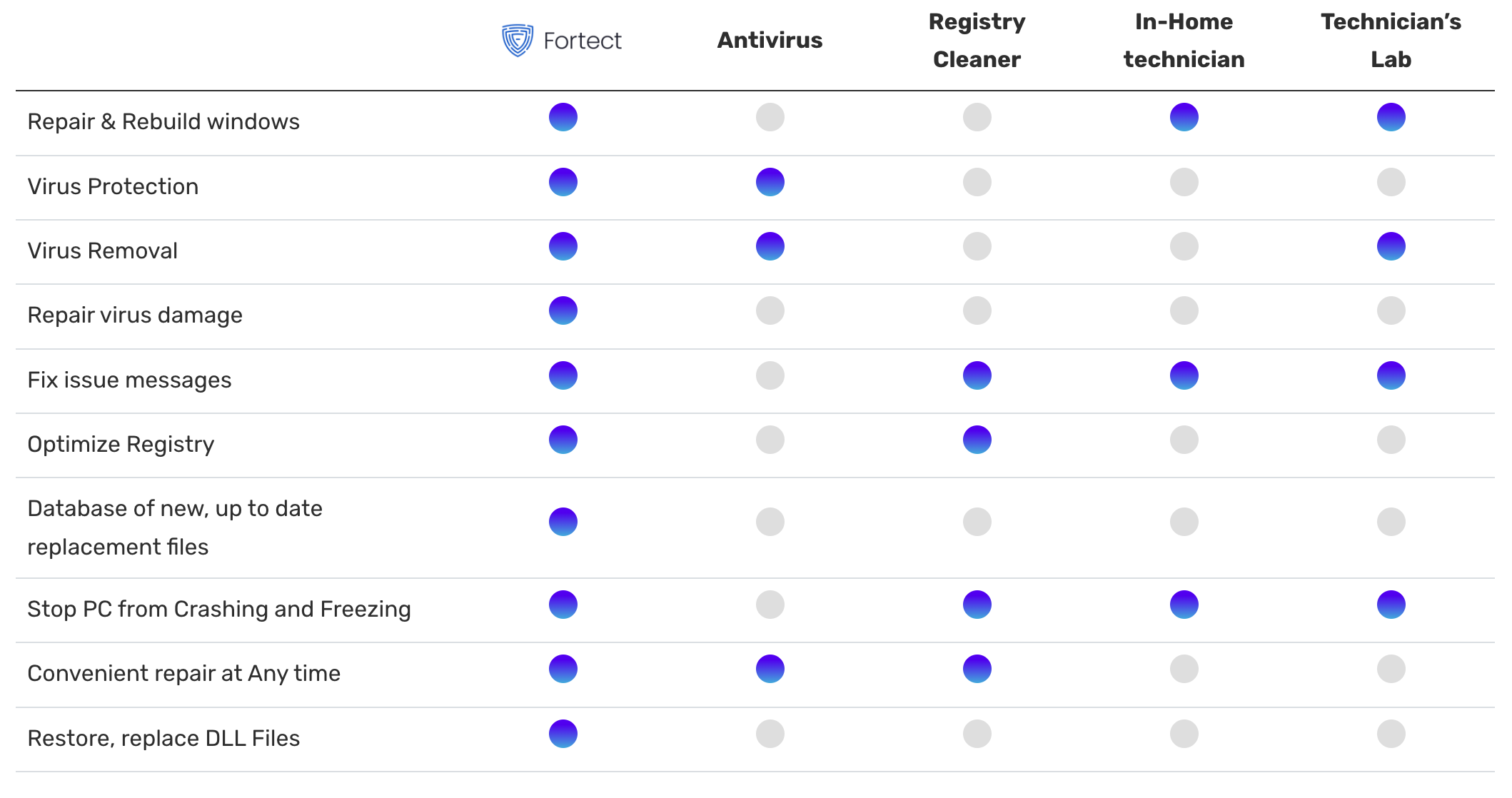
Fortect takes a fundamentally different approach from every other cleaner on this list. While others delete temp files and clear caches, Fortect compares your Windows system files against a known-good baseline and replaces corrupted or missing ones. This is the difference between cleaning your house and actually fixing the foundation.
55%
Boot time improvement
8.2 GB
Junk removed (avg)
847
Issues found (avg)
<1%
CPU usage (idle)
What we liked
- Only tool that repaired corrupted system files without a Windows reinstall
- Bundled Avira-powered antivirus, ransomware defense, and driver updater
- Independently certified: VB100, AV-TEST (6/6), AppEsteem, AMTSO
- 24-hour free trial with full repair access, 60-day money-back guarantee
Where it falls short
- Annual subscription only, no lifetime license option
- Advanced users can’t select individual files to repair or skip
Why Fortect won our top spot: Every other tool on this list cleans up symptoms. Fortect is the only one that addresses root causes by replacing damaged Windows system files. On our malware-damaged laptop, Fortect repaired issues that would have otherwise required a complete Windows reinstallation, saving hours of work. The bundled antivirus (powered by Avira’s independently certified engine) means you don’t need a separate security product.
Who should choose Fortect: Anyone dealing with system instability, crashes, missing DLL errors, post-malware damage, or slow startup times. Also the best choice if you want one tool that covers cleaning, repair, antivirus, and driver updates.
2. CCleaner Professional: Best Free Option
CCleaner Professional
4.3/5
$44.95/year
Free version available
The classic PC cleaner with over 15 years on the market. CCleaner’s free version is genuinely useful for basic cleanup, and the Pro version now includes a driver updater. It excels at manual control, letting advanced users fine-tune exactly what gets cleaned.
42%
Boot time improvement
6.8 GB
Junk removed (avg)
612
Issues found (avg)
Low
CPU usage (idle)
What we liked
- Free version handles basic cleanup well
- Granular control over what gets cleaned
- Driver Updater now included in Pro plans
Where it falls short
- Cannot repair corrupted Windows system files
- No antivirus or malware protection included
- Pro price increased to $44.95/year (was $29.95)
Best for: Tech-savvy users who want manual control over cleanup. Start with the free version. Upgrade to Pro only if you need cloud cleaning, performance optimizer, and driver updates. If you’re dealing with system crashes or corrupted files, CCleaner can’t help there. Read our full CCleaner review.
3. Advanced SystemCare: Best for Beginners
Advanced SystemCare Pro
4.2/5
$19.99/year
Free version available
The simplest tool in our lineup. One-click optimization handles everything for users who don’t want to think about what “registry cleaning” means. Includes basic malware scanning, though it’s not independently certified.
38%
Boot time improvement
5.4 GB
Junk removed (avg)
523
Issues found (avg)
Med
CPU usage (idle)
What we liked
- Simplest interface of all tools tested
- Most affordable paid option at $19.99/year
- Automatic maintenance with set-and-forget scheduling
Where it falls short
- Aggressive upselling to other IObit products during install
- Higher background resource usage than competitors
- Cannot repair corrupted system files
Best for: Complete beginners who want the cheapest set-and-forget solution. Just be prepared to decline the upsell prompts during installation. If your PC has deeper issues beyond junk files, SystemCare won’t address the root cause.
4. AVG TuneUp: Best for AVG Users
AVG TuneUp
4.0/5
$29.99/year
7-day free trial
Solid optimization from a trusted security brand. The Sleep Mode feature is genuinely useful for reducing resource usage of background programs. The catch: antivirus, VPN, and driver updater all cost extra, which adds up quickly.
35%
Boot time improvement
5.2 GB
Junk removed (avg)
489
Issues found (avg)
Low
CPU usage (idle)
What we liked
- Sleep Mode reduces resource usage of idle programs
- AVG Ultimate bundle ($60/year) covers 10 devices with everything
- Trusted brand with good automatic maintenance
Where it falls short
- Driver Updater is $43.99/year extra (Fortect includes it)
- Cannot repair corrupted system files
- No free version (only 7-day trial)
Best for: Users already invested in the AVG ecosystem. The Ultimate bundle is decent value for families with multiple devices. As a standalone TuneUp at $29.99/year (plus $43.99 for drivers), it’s hard to justify over Fortect at $33.95 with everything included.
5. Glary Utilities Pro: Best Budget Option
Glary Utilities Pro
4.0/5
$19.97/year
Generous free version
A comprehensive toolkit trusted by over 200 million users. The free version is genuinely capable, not artificially limited. Over 20 tools covering registry cleaning, disk cleanup, startup management, file recovery, and more.
34%
Boot time improvement
5.8 GB
Junk removed (avg)
534
Issues found (avg)
Low
CPU usage (idle)
What we liked
- Free version is genuinely useful, not artificially limited
- 20+ tools: registry, disk, startup, recovery, and more
- Most affordable Pro option at under $20/year
Where it falls short
- Interface feels overwhelming with so many tools
- Cannot repair corrupted system files
- No antivirus or malware protection
Best for: Users who want to try before buying and care about price above all else. The free version handles basic maintenance well. Upgrade to Pro for automatic scheduling and priority support. For serious system issues, you’ll still need a tool like Fortect.
Full Feature Comparison
| Feature | Fortect | CCleaner | SystemCare | AVG TuneUp | Glary |
|---|---|---|---|---|---|
| Price/year | $33.95 | $44.95 | $19.99 | $29.99 | $19.97 |
| System File Repair | Yes | No | No | No | No |
| Antivirus Included | Avira engine | No | Basic | $39.99 extra | No |
| Driver Updater | Included | Included | Separate | $43.99 extra | Basic |
| Junk Cleanup | Excellent | Excellent | Good | Good | Good |
| Free Version | Scan only | Yes | Yes | 7-day trial | Yes |
| Money-back Guarantee | 60 days | 30 days | 60 days | 30 days | 30 days |
| Security Certifications | VB100, AV-TEST | None | None | None | None |
| Boot Improvement | 55% | 42% | 38% | 35% | 34% |
Which PC Cleaner Should You Choose?
”My PC crashes, freezes, or has corrupted files”
You need system file repair, not just cleanup. Only one tool does this.
Choose Fortect
”I want to clean up junk and have manual control”
You’re comfortable with settings and want a free starting point.
Choose CCleaner
”I’m not technical and just want one button to click”
You want the simplest possible experience at the lowest price.
Choose Advanced SystemCare
”I don’t want to spend anything”
You want a capable free tool with an affordable upgrade path.
Choose Glary Utilities
Do You Actually Need PC Cleaner Software?
Honest answer: not everyone does.
You probably need one if:
- Your PC is noticeably slower than when it was new
- You recently removed malware and things still feel off
- You’re not comfortable running command-line tools like SFC and DISM
- You want automated maintenance without thinking about it
You can probably skip it if:
- Your PC is under 6 months old and running fine
- You’re comfortable with manual optimization and clearing temp files yourself
- You already maintain your PC with built-in Windows tools regularly
Windows 10 and 11 include built-in tools (Disk Cleanup, SFC, DISM, Windows Defender) that handle basic maintenance. PC cleaner software is for users who want more comprehensive, automated results without the technical knowledge. For the manual approach, see our guides on cleaning startup programs, disabling background apps, and freeing up disk space.
Common PC Cleaner Myths
Myth
”Registry cleaning dramatically speeds up your PC”
Reality: Registry cleaning provides minimal performance gains. The real improvements come from startup optimization, junk removal, and system file repair.
Myth
”Free PC cleaners work just as well as paid ones”
Reality: Free versions handle basic cleanup but lack advanced features like system file repair, real-time protection, and automated scheduling.
Myth
”You should clean your PC every day”
Reality: Weekly or monthly scans are sufficient for most users. Over-cleaning wastes time with diminishing returns.
Myth
”PC cleaners can fix any computer problem”
Reality: They can’t fix hardware failures or deeply corrupted installations. Sometimes a fresh Windows install is the only answer.
Conclusion
After testing the leading PC cleaners, Fortect is our top recommendation because it’s the only tool that addresses root causes (corrupted system files) rather than just symptoms (junk files). The bundled antivirus, driver updater, and independent security certifications make it genuinely comprehensive at $33.95/year.
CCleaner remains a solid choice for users who want a free starting point with manual control, though the Pro version’s price increase to $44.95/year narrows the value gap with Fortect.
For budget-conscious users, Glary Utilities offers the best free-to-paid upgrade path, while Advanced SystemCare keeps things simple for complete beginners.
Our advice: if your PC has real issues (crashes, slowdowns, post-malware damage), start with Fortect’s free scan. You’ll see exactly what’s wrong before spending anything, and the 60-day guarantee makes it risk-free. For basic cleanup on a healthy system, CCleaner or Glary Utilities’ free versions may be all you need.
Start With a Free Scan
Download Fortect and see exactly what's affecting your PC's performance. The scan is free, takes about 5 minutes, and gives you a detailed health report.
Free download · 826 KB · 60-day money-back guarantee
Frequently Asked Questions
Are PC cleaners safe to use?
Reputable ones are safe. The tools in this comparison are all established products with millions of users. Fortect holds independent certifications from VB100, AV-TEST, and AppEsteem. Avoid unknown “free” cleaners from unfamiliar websites, as some bundle malware or unwanted software. Always download directly from the official website.
Will a PC cleaner delete my personal files?
No. Legitimate PC cleaners only remove temporary files, browser caches, system logs, and orphaned registry entries. Your documents, photos, videos, and installed programs remain untouched. Tools like Fortect also create system restore points before making repairs, so changes can be reversed.
How often should I run a PC cleaner?
Monthly is sufficient for most users. Weekly if you install and uninstall software frequently. Automated scheduling (available in most paid versions) handles this for you. Daily cleaning provides minimal additional benefit.
Can I use multiple PC cleaners at the same time?
Not recommended. Running multiple cleaners can cause conflicts, duplicate notifications, and higher resource usage. Choose one tool and stick with it. If you want comprehensive coverage, pick a tool like Fortect that bundles cleaning, repair, and security into one product.
What's the difference between a PC cleaner and an antivirus?
PC cleaners optimize performance by removing junk files, managing startup programs, and fixing registry issues. Antivirus software protects against malware threats. Most PC cleaners don’t include antivirus (CCleaner, Glary Utilities, AVG TuneUp). Fortect is an exception, bundling an Avira-powered antivirus with its cleanup and repair tools.
Is there a free PC cleaner that actually works?
Yes. CCleaner’s free version handles basic cleanup well, and Glary Utilities offers a surprisingly capable free tier with 20+ tools. Windows also includes built-in tools (Disk Cleanup, Storage Sense) for basic maintenance. However, free versions can’t repair corrupted system files. For that, you’ll need a paid tool like Fortect (which does offer a free scan and 24-hour free trial).
Why is Fortect more expensive than some alternatives?
Fortect isn’t actually the most expensive tool in this comparison. At $33.95/year, it costs less than CCleaner Pro ($44.95/year) and AVG TuneUp ($29.99/year plus $43.99 for driver updater). The difference is what you get: system file repair, antivirus, ransomware defense, driver updates, and independent security certifications, all bundled in one product. Other tools require separate purchases to match that coverage.
Can PC cleaners fix a slow computer?
It depends on why your computer is slow. If the cause is junk file buildup, too many startup programs, or registry clutter, yes, a cleaner can help measurably. If the cause is corrupted system files (common after malware or failed updates), only Fortect can address that. If the cause is failing hardware (dying hard drive, insufficient RAM), no software can fix it. Our slow startup guide helps you diagnose the specific cause.
Disclosure: This comparison is based on hands-on testing across three Windows systems over 30 days. WindowsTechies may earn a commission through affiliate links, which helps fund our independent testing. This does not affect our rankings or recommendations. See our editorial policy and testing process.
Our Top Recommendation
Fortect
Best for: Users needing comprehensive system repair and security in one tool

Lance Cobain
Founder & Editor-in-Chief
Lance started his journey with Windows back in 1992 as a hobbyist working with MS-DOS and Windows 3.1. He spent years helping family and friends with their PC problems and working on his own projects. Since 2004, he's worked professionally as a software developer and Windows technician, gaining hands-on experience helping people solve their computing challenges. In 2012, he founded WindowsTechies to share that knowledge with everyday users. His face-to-face experience with beginning PC users—from family members to clients—taught him an invaluable skill: explaining Windows in a way that anyone can understand, no matter how complex the topic. With over 30 years of Windows expertise and 20+ years of professional experience, Lance believes that with clear guidance and the right approach, anyone can master their PC and the software they use daily.